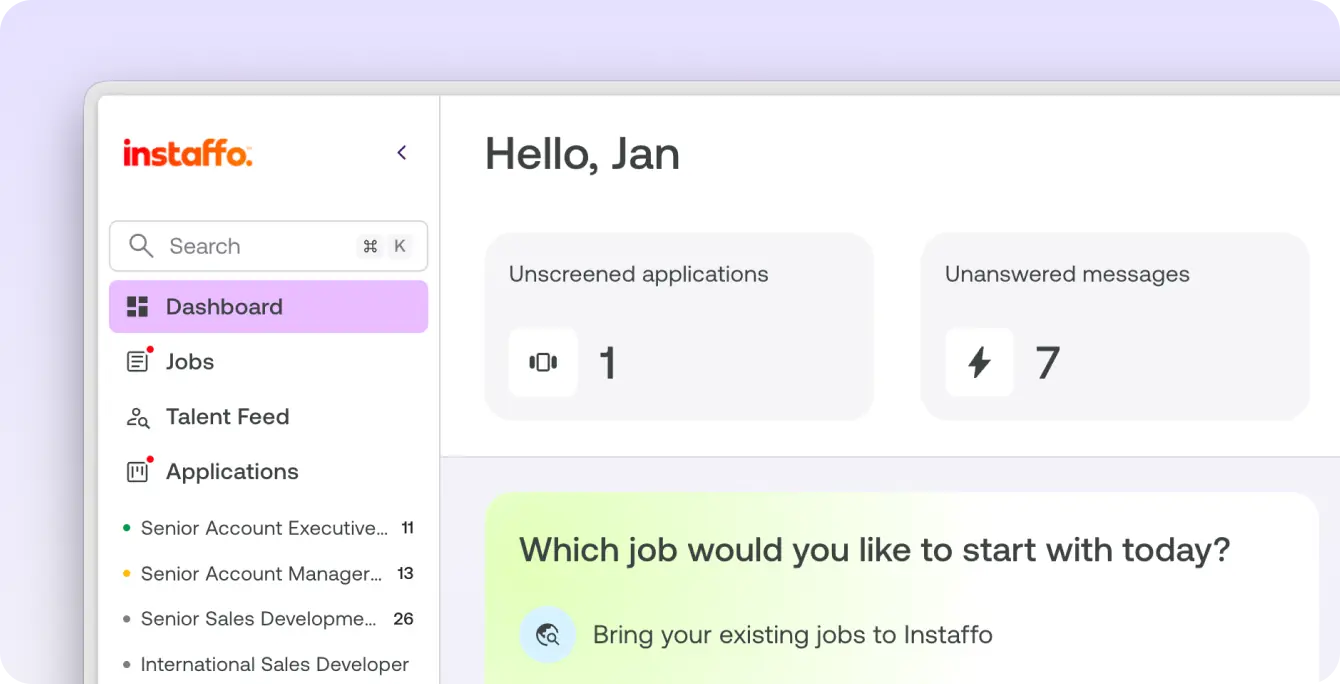
Sidebar navigation: jobs, applications and tools on every page

What it is

The sidebar on the left shows your jobs and their ongoing applications on every page.

Who it's for:
Everyone who works with Instaffo every day and moves between jobs, applications and settings
Sidebar navigation: jobs, applications and tools on every page

What you get

  • Jump to any of your jobs from every view in one click
  • Spot from the color dots which job has something going on
  • Open search, settings and help without leaving your current task

How the sidebar works

  • Get to all your jobs directly from any view.
  • Color dots show status and ongoing applications at a glance.
  • See ongoing applications per job right in the sidebar.
  • Press Cmd K (Mac) or Ctrl K (Windows) to open global search without leaving the page.
  • Reach settings, help and what's new through quick access.

Learn more

The sidebar puts everything important one click away.

  • Jump straight to any of your jobs from every view
  • Color dots show status and ongoing applications per job
  • Open search, settings and help without leaving your current task

You'll find the sidebar on the left of every page.

Read more in the Help Center

Frequently asked questions

Where do I find my jobs on Instaffo?

In the sidebar on the left. It's visible on every page and shows all your jobs.

What do the color dots in the Instaffo sidebar mean?

The color dots show you the status of your jobs and ongoing applications at a glance.

How do I open search on Instaffo?

Press Cmd K on a Mac or Ctrl K on Windows. Search opens without you leaving the current page.

Where do I find settings and help on Instaffo?

In the sidebar. It has quick access to settings, help and what's new.

Find your next talent with Instaffo

Talentkarte eines Senior Financial Analyst auf Instaffo mit Button zum Jobvorschlag