Talent Feed: suggest your job to several people and remind them in one click

What it is

In the Talent Feed you suggest your job to several people at once and remind them in one click.

Who it's for:
Everyone who reaches out to several people per job through the Talent Feed
Talent Feed: suggest your job to several people and remind them in one click

What you get

  • Skip single messages: everyone gets the same suggestion, and you save the message as a template
  • Follow up in one click, or remind all open suggestions at once
  • Start chatting as soon as a talent accepts

How to suggest your job to talent

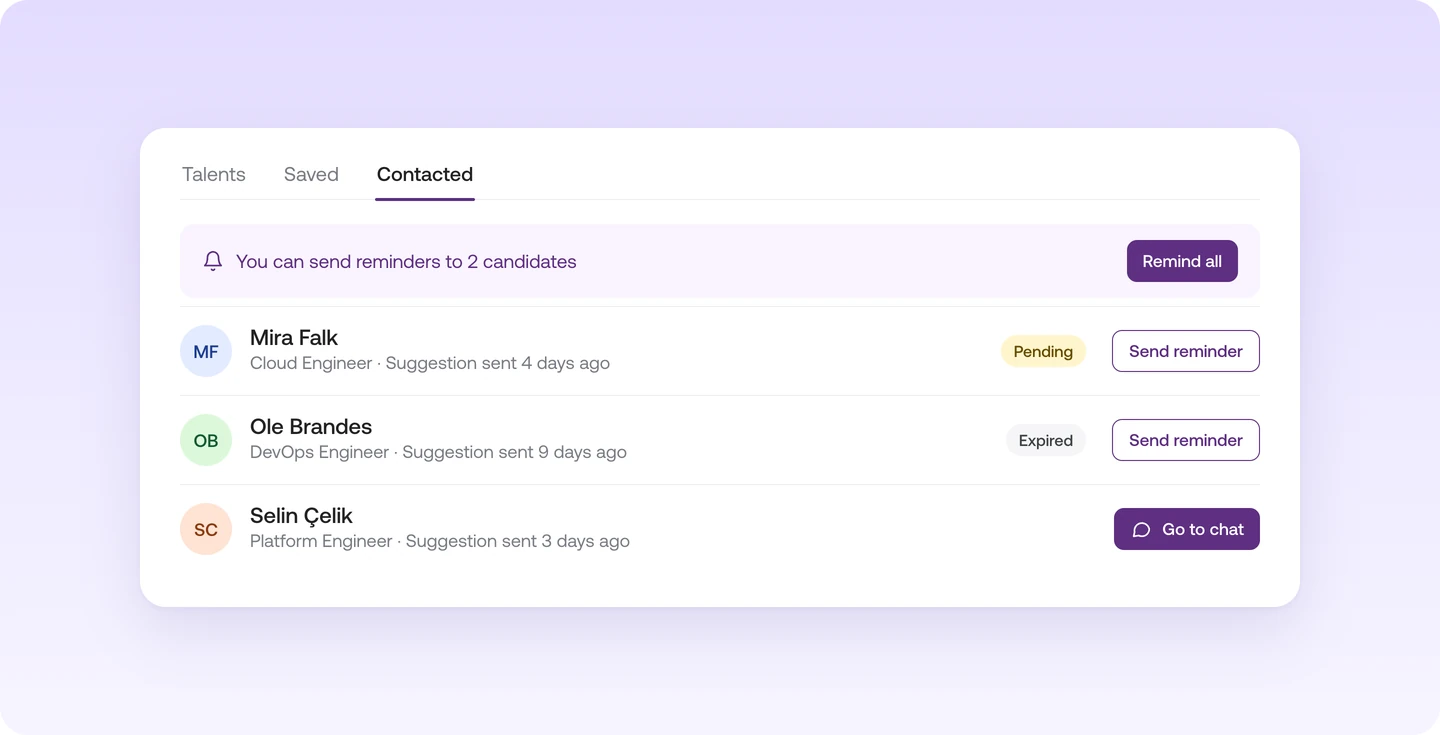
In the Talent Feed, every job has three tabs: "Talents" with matching profiles, "Saved" with people you've bookmarked, and "Contacted" with everyone you've suggested the job to.

  1. Save talent. Click "Save" on profiles you like. In the "Saved" tab, the people you saved are already selected.
  2. Suggest your job. Click "Suggest job" at the bottom, and everyone selected gets the same suggestion. In the dialog, pick a template or write a short message. The talent sees your job, so you don't need to describe it.
  3. Track the status. The "Contacted" tab shows for each talent whether your suggestion is pending, has expired or was declined.

When you can follow up

A few days after your suggestion, "Send reminder" appears on open suggestions. If nobody has replied yet, "Remind all" reminds every open suggestion at once. When a talent accepts, "Go to chat" takes you straight to the conversation.

Learn more

In the Talent Feed you reach out to several people at once and then see who has replied.

  • Tick the people who fit and send them all the same suggestion. Save the message as a template for next time
  • Each talent shows whether your suggestion is pending, has expired or was declined
  • If someone hasn't replied, send a reminder in one click, or remind all open suggestions at once
  • Once a talent accepts, you can start chatting right away

You'll find it in the Talent Feed under "Contacted".

Read more in the Help Center

Frequently asked questions

How do I reach out to talent from the Talent Feed on Instaffo?

Click "Suggest job" on the talent and write a short message or pick a template. To reach several people at once, save them first and send the suggestion from the "Saved" tab.

How long does a Talent Feed suggestion on Instaffo stay open?

7 days from when you send it. If you send a reminder, the 7 days start again.

Can I remind talent about my suggestion on Instaffo?

Yes. A few days after your suggestion, use "Send reminder", or "Remind all" for every open suggestion at once.

Where do I see who has replied to my suggestion on Instaffo?

In the Talent Feed, in the "Contacted" tab. Each talent shows whether the suggestion is pending, has expired or was declined.

What happens on Instaffo when a talent accepts my suggestion?

You can start chatting right away. In the "Contacted" tab, "Go to chat" takes you to the conversation.

Find your next talent with Instaffo

Talentkarte eines Senior Financial Analyst auf Instaffo mit Button zum Jobvorschlag